Early access

Nova logs the expense and moves the appointment

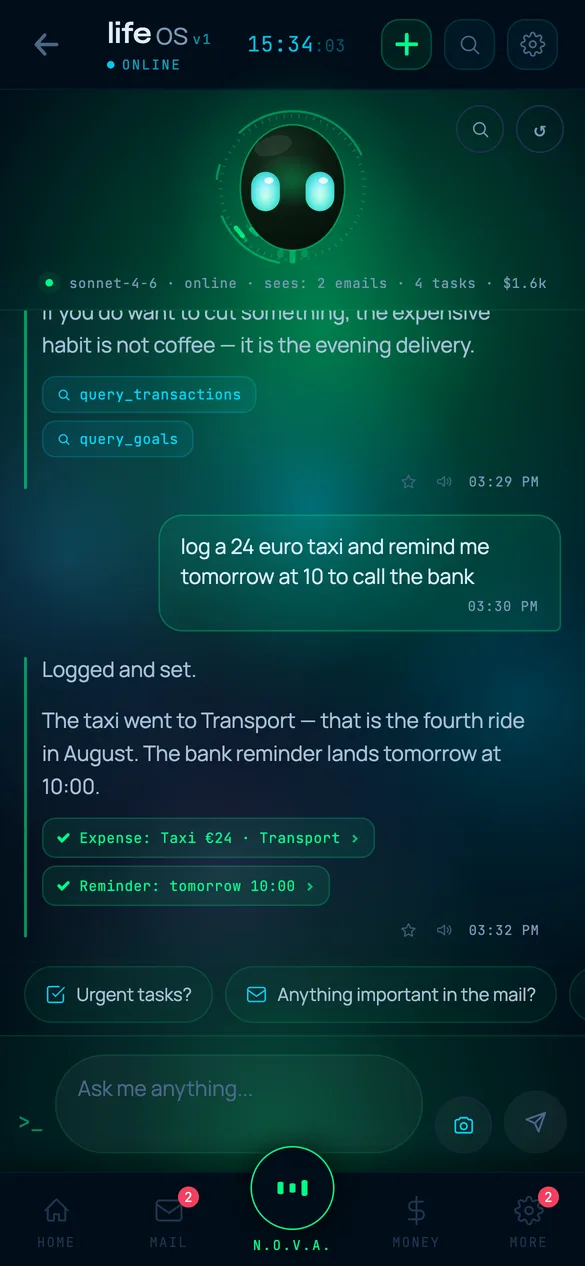
You write to her like a person: paid for internet, 300 hryvnia, move the dentist to Thursday. She changes the data across thirteen areas of life, and a card stays in the chat with exactly what changed.

Not in the stores yet: TestFlight for friends, an APK for family.
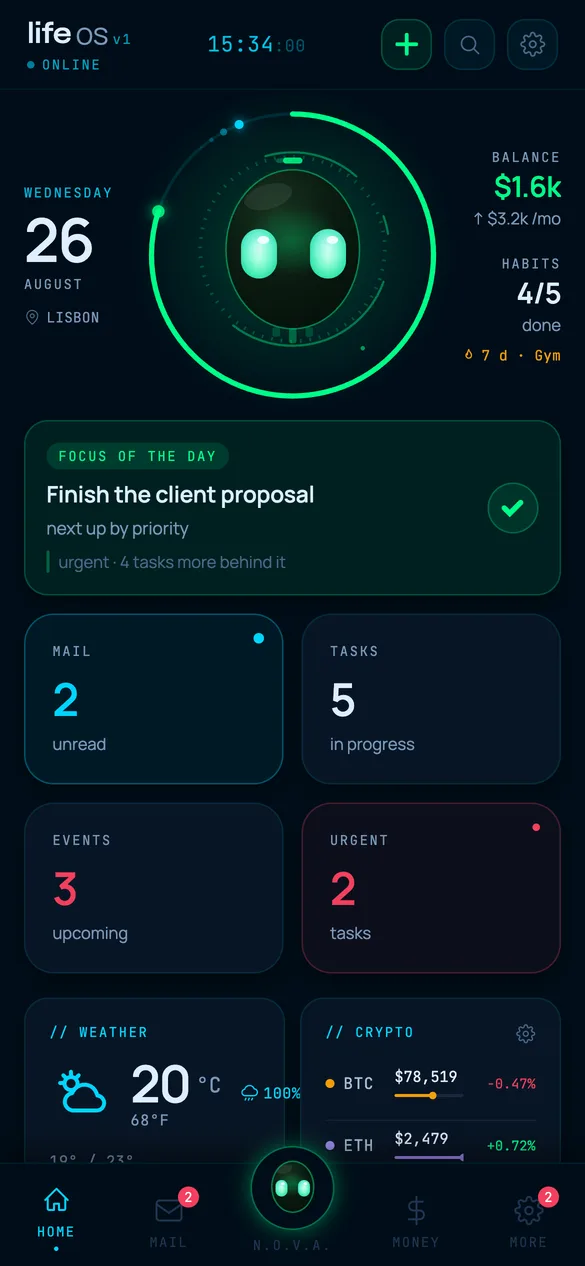
Life OS home screen: the day ring, the focus of the day, weather and crypto
Chat with the N.O.V.A. assistant: cards for completed actions and the data sources behind them

65 tools

Where she has write access

The assistant inside the app doesn't retell your data back to you. It changes it. 65 tools, 17 of them read-only, the rest write. All 65 have a real handler behind them, and none of them is a stub.

Money
Log an expense, fix a wrong category, check the budget. What lands is a record in the database, not advice to write one down.
Day and calendar
Create a task, close it, move a meeting, hang any of it on a life goal. The event is created locally. It reaches Google only if you turn sync on yourself.
Habits
Mark a day done, read the streak, spend a freeze token on a day you missed. A forgiven day shows up on the heatmap as rescued, not as done.
Mail
Reads the inbox, searches it, drafts a reply and sends it. That is the whole list. The app doesn't pretend to be a mail client. Gmail API
Journal, goals, subscriptions, job applications
A journal entry, a new goal, a service you subscribed to, an application to a job from the RemoteOK feed. Applications sit in the same database as money and habits, so you see them next to each other.
Language of the conversation
Nova works in whatever language you wrote to her in. The interface itself is built in two: English and Russian. 2963 translation keys in each language
Size of the app
13 areas of life plus settings. Not one screen with widgets on it, but 23 screen files. 15 navigation items
Chat with the N.O.V.A. assistant: cards for completed actions and the data sources behind them
65
tools
Nova has, 17 of them read-only
13
areas of life
in one database on the phone
672
tests
green, 0 failures
0
trackers
analytics or ads in the dependencies

three routes in

Nothing changes silently

You don't retype anything by hand: spending has three ways in, and mail and calendar connect with a Google account. Not one of those routes writes without saying so.

A card after every change

When the action finishes, a card comes back into the chat: which record changed, and by how much.

The scanner shows first

A camera frame, a screenshot or a file. Claude reads the lines, they land in a preview, and until you confirm them they are not in your expenses.

The category the model returns gets mapped onto the app's own list, and if you once corrected the category for that shop, your correction wins. The scanner learns from fixes.

The import says what it threw out

Transactions already on file get filtered out and the app tells you how many. A silent "imported" doesn't count as an answer.

An ambiguous date like 03.04 gets read back to you out loud: here is how I understood it. One tap flips every date.

monobank hands over the statement on request

You tap pull, and it takes everything since the last sync and reaches three days back, because held amounts take a while to settle.

Duplicates get cut twice: by bank id, and by day plus amount

Settings own up to a conflict

The app names the quiet war between its own switches. The morning briefing landed inside quiet hours, so the push will never arrive, and it says that in plain words.

Caught before you decide notifications are broken

The way out is open

The JSON backup is for the app, so it can restore itself. The CSV is for you, so you can leave.
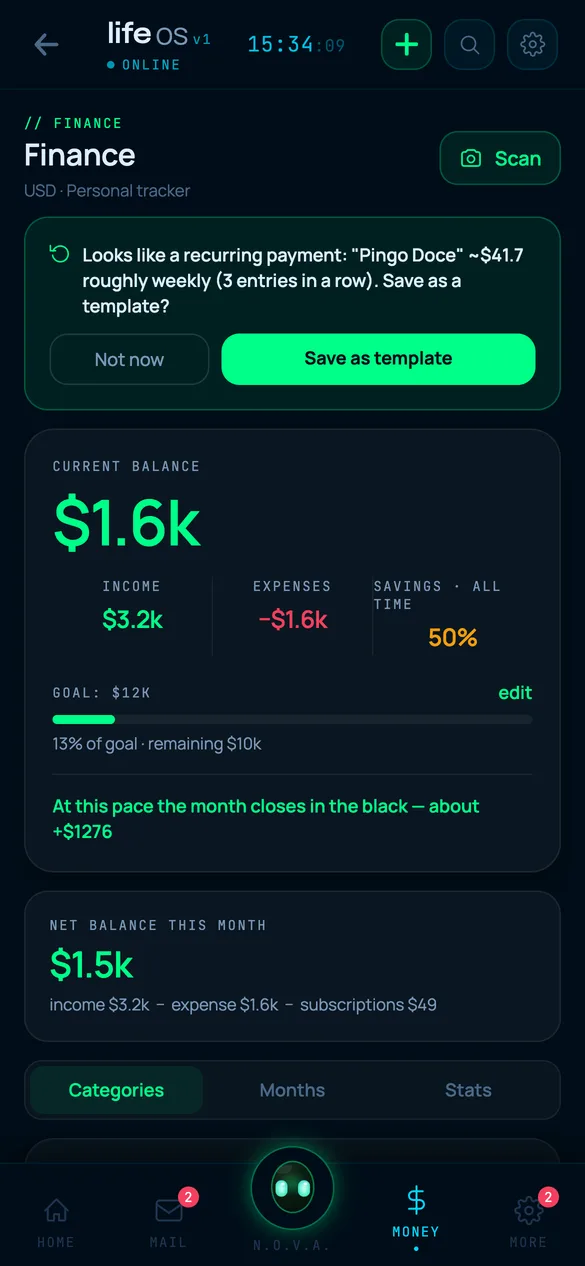
Finance screen: balance, savings goal and a recurring payment the app spotted

local rules

Rules find the links, not AI

Links between areas are found by rules. Nothing leaves the phone and no quota is spent, and it works for someone who never connected an AI at all.

Bad days cost more

The rule puts the mood mark from your journal next to what you spent that same day.

Meeting days break streaks

Calendar density gets lined up against the misses in the habit tracker on those same days. The rule names the overlap, not the cause.

Late nights and the next morning

Late activity gets compared with the next day's mood. Both halves of that link live in the same database: no sleep tracker knows how you will feel tomorrow.

One query across 8 areas

One line searches eight sections at once, with no jumping between screens and no choosing where to look first.

A catch-up digest

Two days away or more, and what waits for you is a readout of what piled up, instead of a feed that says nothing.

Threshold of 2 days

Home

The ring counts time, not checkmarks

The ring on Home holds two percentages next to each other: how much of the day has gone, and how much of today's list is closed. Old backlog stays out of the daily total, or the ring would be lying to you every morning.
Two percentages side by side
The day is 70 percent gone, the tasks are 30 percent closed, and the gap is visible while there is still time to close it. A reading for right now, not a score at bedtime
Steps and sleep next to tasks
Home shows steps and sleep for the last day. Nova gets all four readings, heart rate and calories included. HealthKit and Health Connect
A goal as a hub
Tasks, habits, journal entries and savings attach to a life goal. The retro counts separately how much real focus time went into it.
She comes back days later
You talked through a hard conversation with your boss, and a few days later she asks how it went. Not a reminder you set, a question you had already forgotten. schedule_checkin
A decision log
A decision entry is tied to an outcome entry. So "how many of my decisions are still hanging" has an exact answer instead of a feeling.
The weekly ritual
First last week's three priorities, checked against what actually happened. Then stuck goals and overdue items, and at the end you pick three priorities for the week ahead.
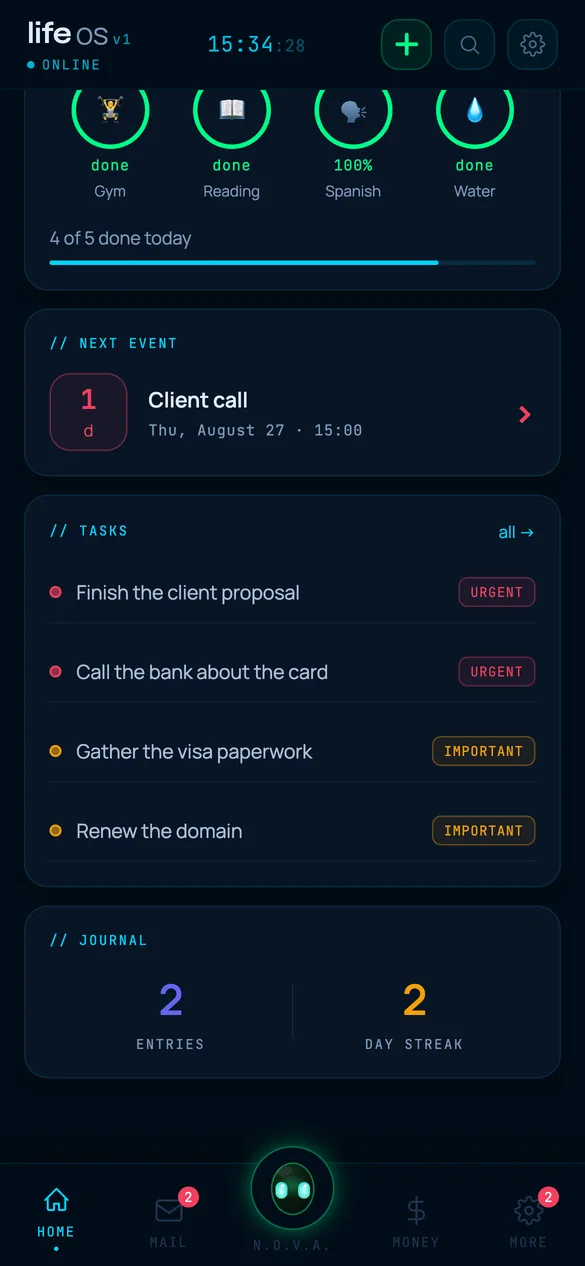
Home screen: habit rings, the next event and the task list

threshold 8

Silent while the data is thin

A conclusion drawn from three observations is a guess with a straight face. So where observations are few the app says nothing, and where a number came off the network it carries its own age beside it.

The tool refuses to conclude
With fewer than eight closed decisions, query_decisions will not report a pattern. It hands back the raw list of entries and leaves the reading to you.
The threshold doesn't slide
The number 8 sits in three places in the code, independently of each other. It isn't a sensitivity slider, it is the line below which there are no conclusions.
Silent when there is no link
The links card shows up only when a rule actually found something. Nothing found and it is simply not on Home, instead of a cheerful empty frame.
A stale price carries its hour
If prices have been stuck for more than fifteen minutes, the card says which hour the numbers are from, instead of passing yesterday off as live.
News carries its cache age
The Google News feed is stamped with how long ago it was pulled. The converter runs on Frankfurter and shows the rate together with the day that rate is from.
A net worth snapshot older than 60 days
If the asset estimate hasn't been updated in a long time, the app marks it instead of showing a number that only looks fresh.
A board of service status
Nine outside services are named one by one, each with a line about what breaks for you if it goes quiet. 11 live sources: Claude through my own proxy, Gmail, Google Calendar, Google WaveNet, Open-Meteo for weather and geocoding, CoinGecko, Frankfurter, Google News, RemoteOK, monobank, and health through HealthKit with Health Connect

storage

I don't have your data

Not "we don't sell your data", but there is nothing to sell: no user account exists, and no database of other people's records either. There is nowhere for such a database to live.

123 storage keys on the phone

Everything you enter sits in device memory and leaves with the device.

Zero analytics, zero trackers

They are simply absent from the dependencies. That is checkable against the package list, not against a promise in a policy.

0 analytics, 0 trackers, 0 ad SDKs

monobank goes around me

The request leaves your phone straight for the bank. There is no middle point where your transactions could settle.

Backup as mail to yourself

The one copy that lives off the phone works without a single server of mine: the backup arrives in your mailbox, and the mailbox is the storage.

A sanitizer on every cold start

A copy can be pasted in from the clipboard, which means arbitrary JSON can arrive that way. So storage is cleaned on every launch.

The Claude key

In a release build the Claude key lives on a server, not in the app, so it can't be pulled out of the file you downloaded.

the meter

The AI cost, shown in dollars

The app adds up what the requests to Claude cost and keeps that number in sight.

The ceiling switches the model

Reach the amount you set, and the app moves itself to a cheap model instead of quietly spending on.

It doesn't shut off and it doesn't ask you for money

Two modes

Everyday and Thorough, switched by hand. You choose the mode, the app doesn't guess it for you.

Reads aloud, sees files

Nova has a voice, a cloud one included. Photos she sees too, and a PDF statement goes to the scanner in Finance.

Google WaveNet

Only Nova turns into dollars

The ring, the search, the statement import and the local rules all run on the phone. Money goes on requests to Claude: talking to Nova, and reading receipts.

made by hand

One author, 672 tests

I write the app alone and all the code is mine. Below is where the time went besides features.

Dark theme only
There is no light one. If you need light, this app won't suit you, and it is better to learn that now than after you install it.
672 tests, 0 failures
55 test files pass with nothing failing. That is not a promise there are no bugs, it is how I catch my own breakage before a build.
Settings are searched, not scrolled
Search runs over 39 settings items, and one of three presets lays down a working configuration in a tap. 39 items, 3 presets
302 labels for the screen reader
Text size moves in three steps. The labels are placed across the whole app, not only on the main buttons. 302 accessibilityLabel
A resting frame instead of a switch
The system setting for reduced motion doesn't just cut animation dead. Every looping animation has a described frame where it stops somewhere that makes sense.
122 icons drawn by hand
40 of them for habits. Haptics are placed across the app, not on a couple of display screens. 194 haptic calls in 24 files

screens

What it looks like

Captured from the running app, not drawn. The data on screen is made up, the interface is real.
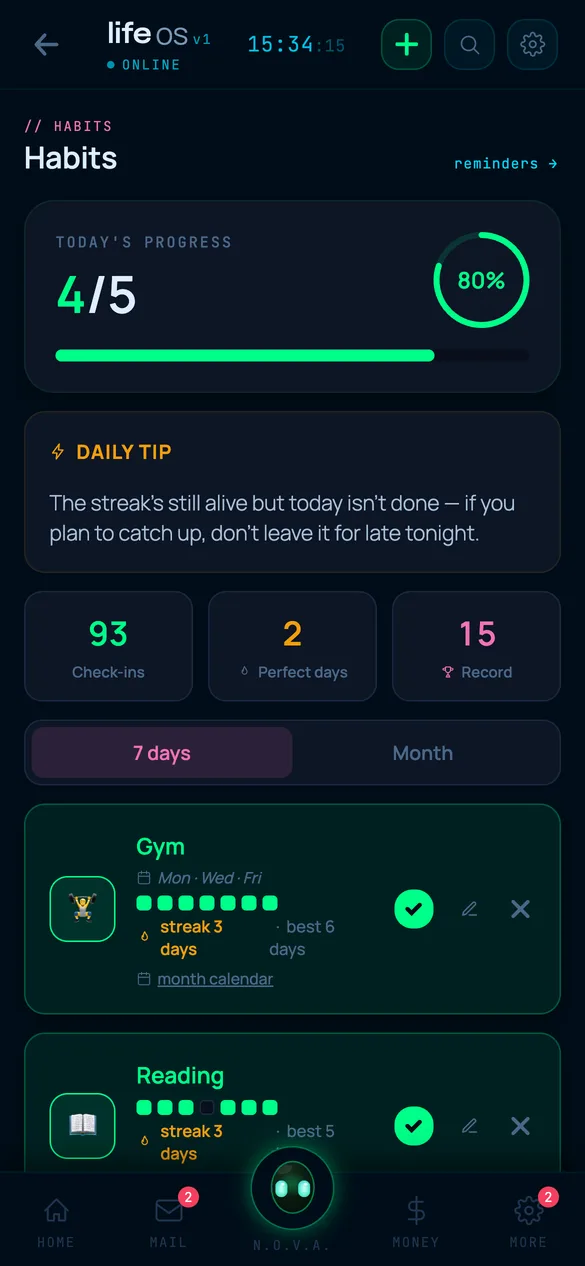
Habits screen: progress for the day, streaks and a heatmap
Habits
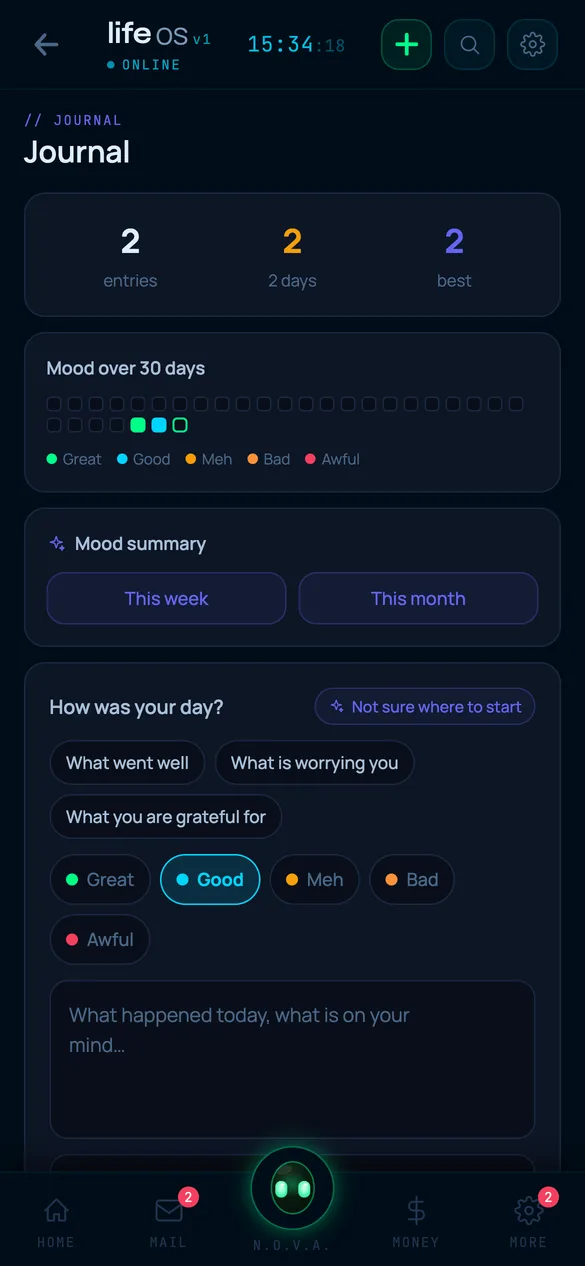
Journal: entries and mood over 30 days
Journal
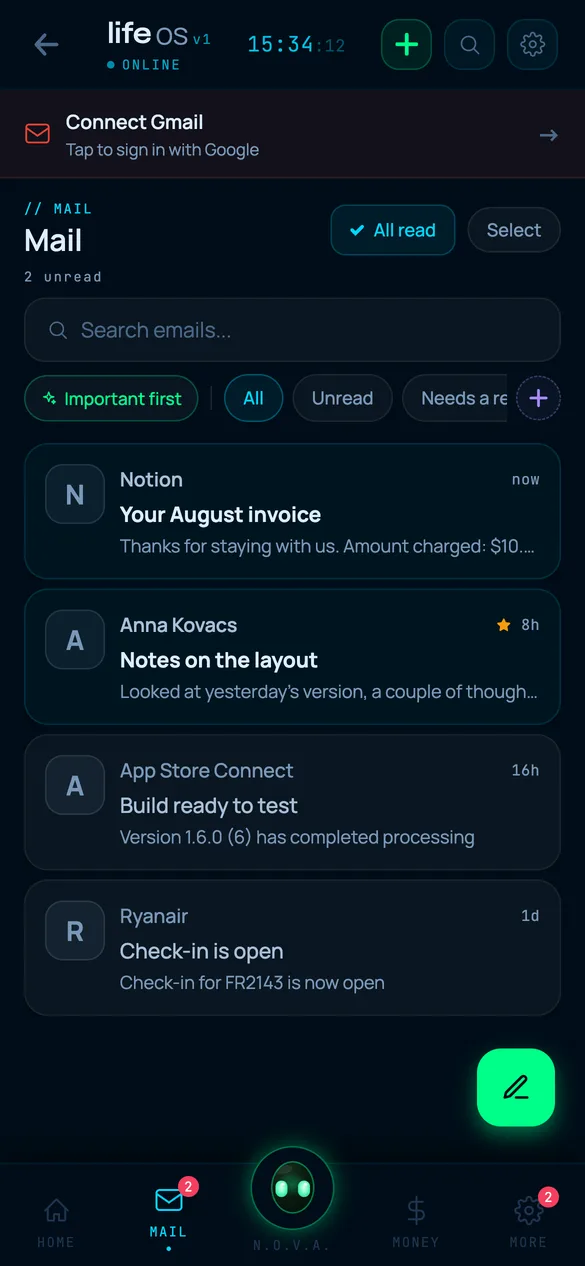
Mail: messages with filters and search
Mail
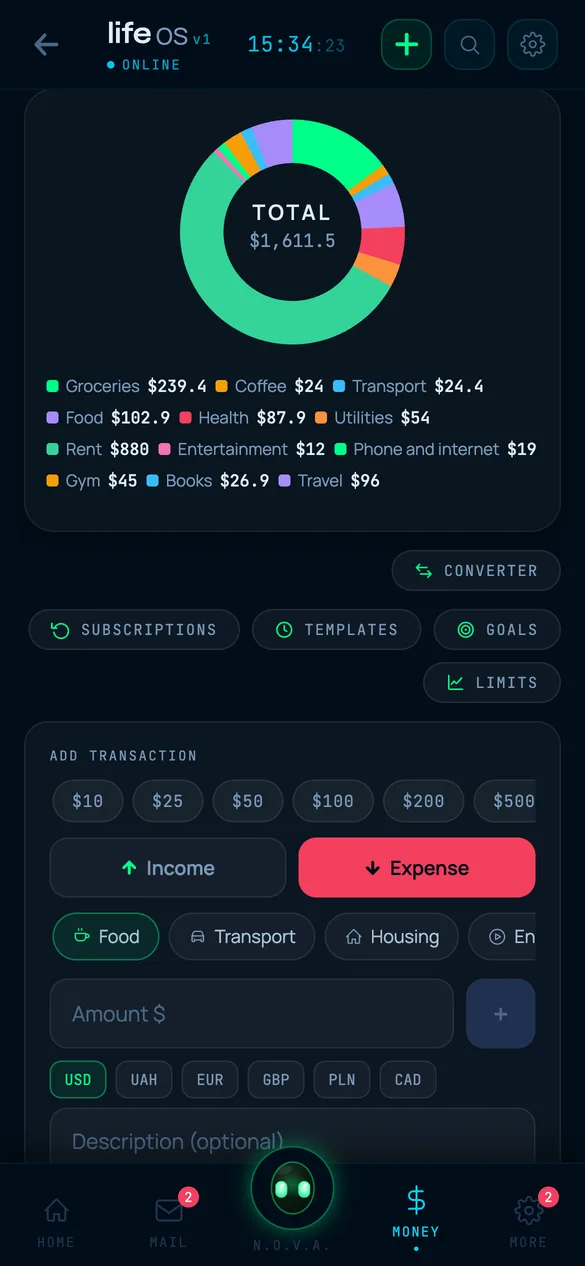
Spending by category: ring chart with amounts
Spending

I'll write when it opens

Version 1.6.0 is built for iOS and Android: friends run it through TestFlight, family through an APK. It is not on the App Store or Google Play. I'm writing it alone, so I won't name a date until I'm sure of it.

The email is for one message: the app is out, here is the link. One address, one message. I pass it to nobody.